



One location had a great month. Another spent more on labor than you expected. Now you need to know where the whole group stands, and the answer is spread across separate reports.
That’s the challenge with running multiple restaurants: each location has its own story, but you still need a reliable set of numbers for the business as a whole. Consolidating your financial statements brings those numbers together so you can see what’s working, spot trouble, and make decisions with more confidence.
Here’s how to get your locations reporting consistently and build a consolidated view you can actually use.
What Is Financial Statement Consolidation?
Financial statement consolidation brings your restaurants’ individual financial reports together into one set for the group. Instead of reviewing each location’s profit and loss statement, balance sheet, and cash flow statement in isolation, you get a combined picture of how the business is doing.
The catch? Those reports need to speak the same language. If locations categorize expenses differently or report on different periods, the totals won’t tell a reliable story. Consistent account categories and reporting dates give you a clearer view of the group, while location reports help you dig into what’s driving those results at each of your restaurants.
Accounting Principles for Multi-Concept Operators
You’ve worked diligently to create a duplicable system with a proven business model and support for your franchisees. While this growth can be quite lucrative, it also demands a sophisticated accounting approach— one that not only manages your own operational finances but also oversees the financial health of your franchisees. To succeed, you’ll need a robust system that can provide comprehensive visibility into the financial data across your entire network.
Challenges for Multi-Concept Operators
Managing multiple concepts means navigating complex financial data with diverse variables and categorization. You’re tasked with consolidating information across different brands and locations, each with its own sales patterns, inventory needs, and staffing requirements. If you operate without the benefit of a centralized data system, you’ll need to be especially careful with resource allocation and expense tracking to minimize errors and information bleed.
Standardizing accounting practices in a multi-concept operation can be a significant hurdle, and a “one-size-fits-all” approach is unlikely to work well in your operation. However, a failure to get this piece right can lead to inaccurate forecasting, poor financial decisions based on imprecise data, and potential compliance issues. Over time, these issues can add up to wasted resources and cash flow issues that can destabilize your broader operations.
Entity Structure & Chart of Accounts Strategy
Before you combine the numbers, sort out which businesses belong in the report. A location isn’t always its own legal entity: one LLC might own three restaurants, while another owns the commissary. Map out your entities, ownership, and locations with your accountant. Independently owned franchisees don’t automatically belong in your consolidated financials.
Then get everyone working from the same chart of accounts—the categories you use to record sales, expenses, assets, and liabilities. It needs to cover every category used across all your brands, not just the ones at your busiest concept. Your pizza shop may need delivery sales accounts that your cocktail bar never uses. Keep those details, but make sure they roll up into consistent group categories. Each location only needs to use the accounts that apply to it.
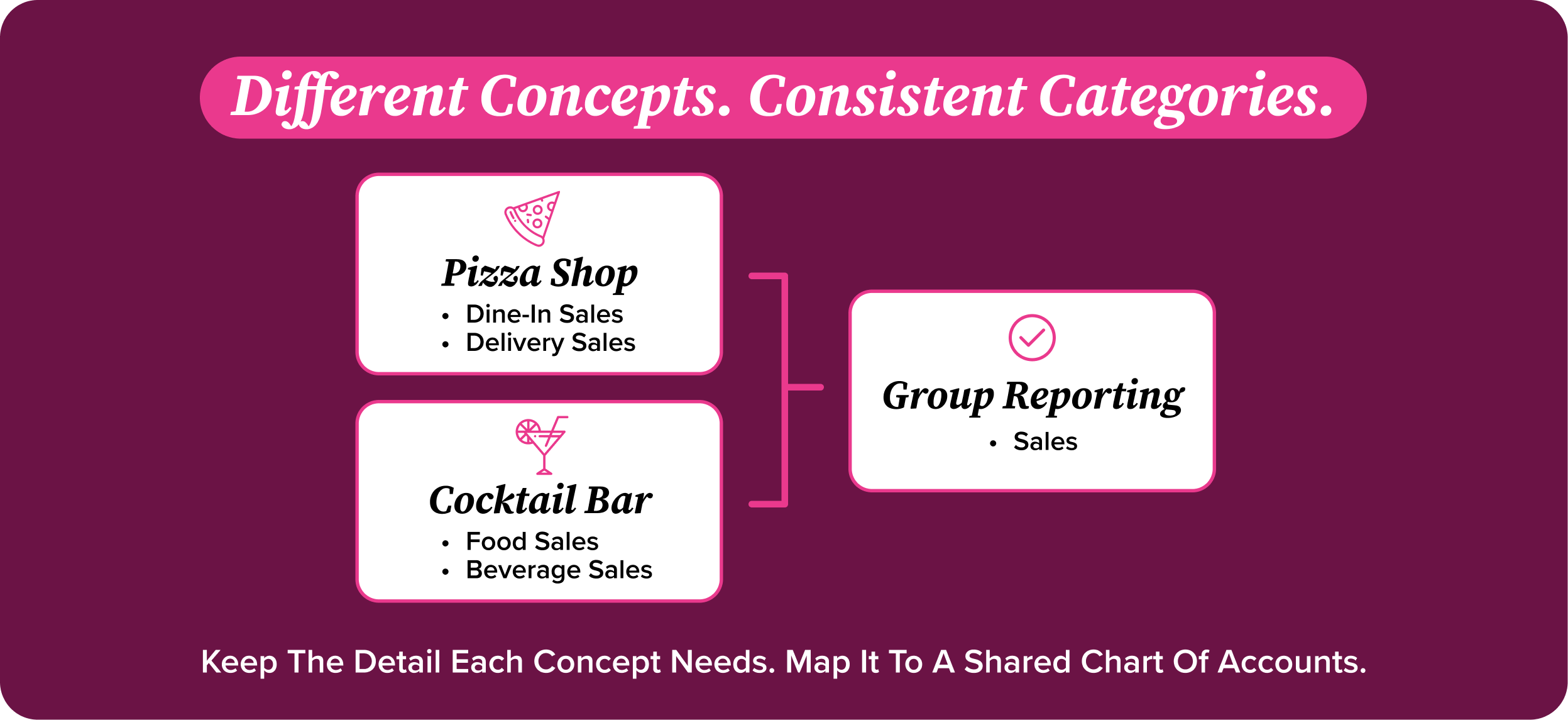
Keep that shared chart in one centralized, cloud-based accounting system that every location can reference. That way, managers aren’t working from an old spreadsheet or inventing a category when they can’t find the right one. Set clear rules for where transactions go and who can add accounts. If one store puts takeout containers under food cost and another puts them under operating supplies, you’ll spend month-end sorting out the difference instead of reviewing performance.
Track each location separately within that setup so you can check one store’s labor costs and still see the group totals. Flag transactions between entities, too, including management fees and commissary charges. Your accountant will need to eliminate internal activity during consolidation so money moving between your own businesses doesn’t inflate the group’s revenue or expenses.
The Consolidating Financial Statements Checklist
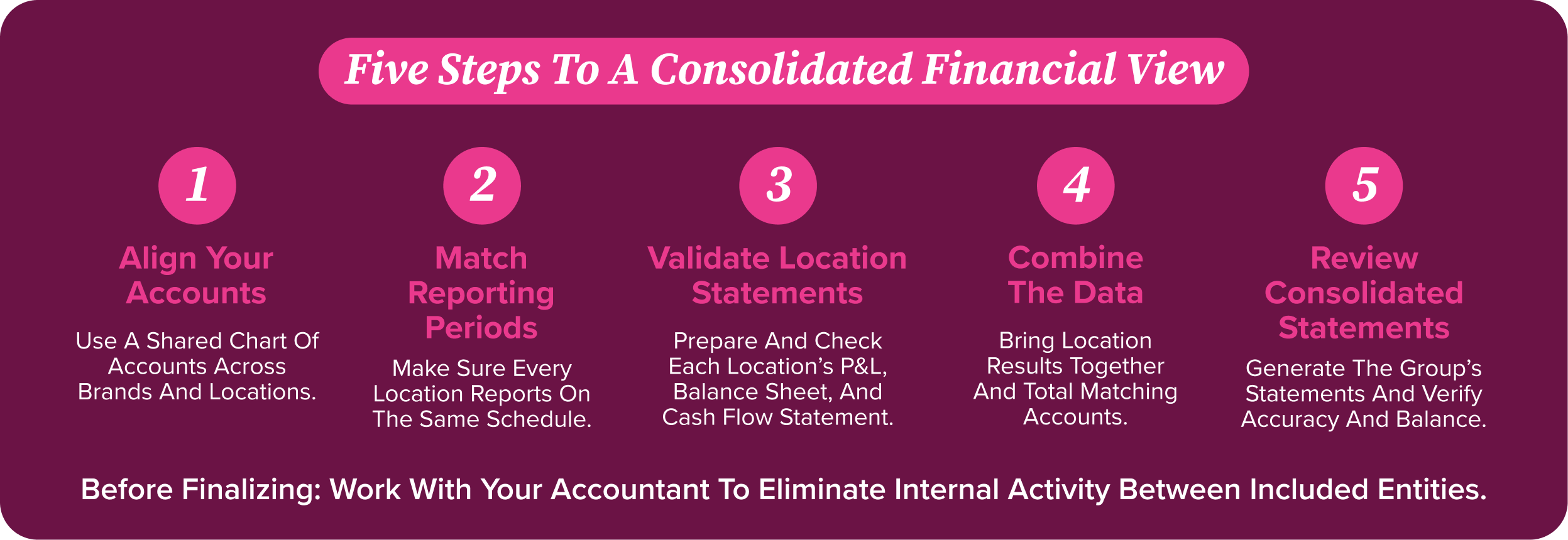
Follow these five steps to consolidate cleanly:
- Standardize your chart of accounts – make sure it includes all categories used across all brands, and use a cloud-based centralized system that can reference it at all locations.
- Standardize your reporting periods – establish a clear reporting schedule that is the same across all locations and communicate it to managers.
- Generate financial statements for each location – create P&L statements, Balance Sheets, and Cash Flow statements for each brand concept or location, and ensure each is accurate and balanced prior to consolidation.
- Combine financial data into a single unified spreadsheet – add statement data from all locations into one spreadsheet or software program and calculate new combined totals for accounts used across multiple brands or locations.
- Generate a consolidated set of financial statements – use the combined data to produce a consolidated set for your business, and verify the newly combined data is still accurate and balanced.
Tips for Smoother Accounting Management
These challenges may seem overwhelming, but managing accounting within your multi-concept restaurant(s) becomes easier with a solid strategy and a flexible system. You can gain a clear, consolidated view of your business with these practical steps:
- Use a centralized accounting system that aggregates data from all locations and brands through a cloud-based portal that you can manage from anywhere.
- Leverage robust data tools that include forecasting and reporting features to save time and effort on manual data crunching.
- Develop a standardized chart of accounts and reporting templates that adequately reflect the nuances of your various brand concepts.
- Schedule regular manager meetings with your team where financial performance is reviewed, and any necessary action plans are discussed.
- Utilize automated inventory tracking systems with Back Office that simplify store-to-store transfers and purchasing.
Get these routines in place, and you’ll spend less time chasing numbers across locations and more time figuring out why food costs jumped at one store before they eat into the group’s profits.
The 13-Period Calendar & Same-Store Sales
An extra Saturday can make sales look better without a single extra guest walking through the door. That’s why reporting periods matter.
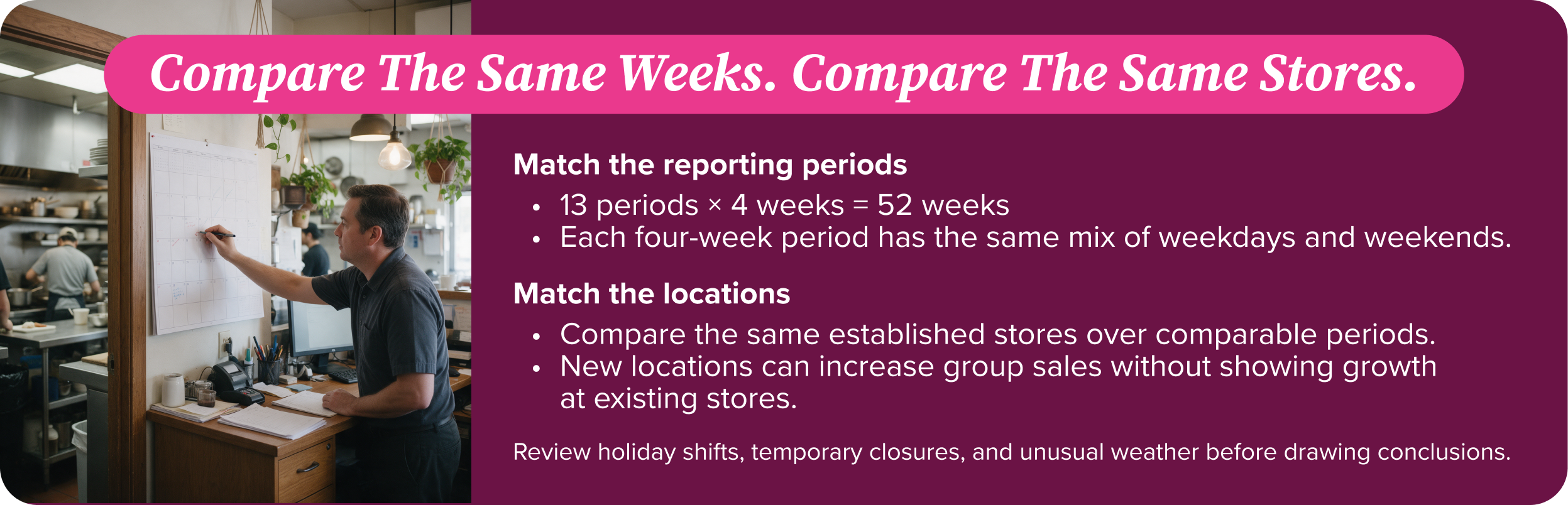
A 13-period calendar splits a 52-week year into 13 blocks of four weeks. Each period has the same mix of weekdays and weekends, giving you a more consistent starting point for comparing sales, food costs, and labor across locations. Get every store on the same schedule before combining their numbers.
Then check same-store sales: compare sales at the same established locations over comparable periods. Opening another restaurant can lift group revenue, but it won’t tell you whether your existing stores are growing.
Keep the comparison honest. Holiday shifts, temporary closures, and unusual weather can still skew results. Agree on which stores qualify, document exceptions, and review those numbers alongside the group totals. You’ll have a better shot at spotting real growth rather than just a busier reporting calendar.
How Back Office Automates Consolidation
Getting a clear picture of your restaurant group’s finances shouldn’t mean rebuilding a spreadsheet every week. Back Office brings multi-unit financial consolidation and comparisons into one reporting system, so you can review the group’s performance and see how individual locations stack up.
Start with the Multi-Unit Financial Summary, then use side-by-side financial reporting to compare locations. If a number needs a closer look, drill down into purchasing details, inventory items, and general ledger distribution- all the way down to the guest check. That gives you a way to investigate what’s behind the totals, rather than stopping at the consolidated view.
Back Office also provides weekly financial statements, including P&L, balance sheet, cash flow, and trial balance reports. A customizable chart of accounts lets you track income, expenses, assets, and liabilities around your business structure, while support for 13-period, 4-4-5, and 5-4-4 accounting cycles helps you review performance on a schedule that fits your operations.
The result is less time spent assembling reports and more time using them: spotting differences between stores, adjusting budgets, and deciding where to focus attention.
Book a demo to see how Back Office can simplify financial reporting across your restaurant group.
FAQ’s
What is financial statement consolidation for a restaurant group?
Financial statement consolidation is bringing the financial reports from the restaurants in your group into one set of statements. That includes your profit and loss statement, balance sheet, and cash flow statement.
How do you consolidate P&L statements across multiple locations?
Standardize the chart of accounts and reporting periods, generate financial statements for each location, combine financial data into a single unified spreadsheet, then generate a consolidated set of financial statements.
Why standardize a chart of accounts across restaurants?
So data rolls up consistently – make sure your chart of accounts includes all categories used across all brands and reference it from one centralized system.
What are the biggest challenges in multi-unit restaurant accounting?
Consolidating information across different brands and locations, each with its own sales patterns, inventory needs, and staffing requirements, and standardizing practices without a “one-size-fits-all” approach.
Can consolidation be automated?
Yes – Back Office software can automate your consolidation process, eliminating all of these steps in just a few clicks.