

Keeping the right amount of inventory on hand is a constant balancing act. Order too much, and cash sits on the shelf while perishable products spoil. Order too little, and the kitchen may run out of a key ingredient during service or be forced to make an emergency order at a premium.
Because sales patterns, delivery schedules, menu changes, and seasonal demand all affect inventory needs, those targets should change along with the business. Restaurant PAR levels provide operators with a repeatable way to determine how much inventory to keep on hand.
What Is Restaurant PAR?
Restaurant PAR (Periodic Automatic Replacement) is the target amount of an inventory item a restaurant should keep on hand to meet expected demand. Operators establish PAR levels based on how much of an item the restaurant typically uses and how often it can be replenished.
PAR levels can be used for everything from proteins and produce to beverages and supplies. Instead of ordering what “looks low” or simply repeating the previous order, operators use PAR levels to make purchasing decisions based on actual inventory needs.
Restaurant PAR Formula
The restaurant PAR formula uses average weekly usage, safety stock, and delivery frequency to establish how much product is needed between deliveries.
PAR Level = (Average Weekly Usage + Safety Stock) ÷ Number of Deliveries Per Week
Average weekly usage is the amount of an item the restaurant typically uses in a week. Safety stock provides a buffer for unexpected demand or delivery disruptions. Delivery frequency accounts for how frequently the restaurant can replenish the item.
Restaurant PAR Calculation Example
Suppose a restaurant uses 40 pounds of chicken per week, keeps 10 pounds as safety stock, and receives two deliveries each week.
(40 pounds + 10 pounds) ÷ 2 deliveries = PAR level of 25 pounds
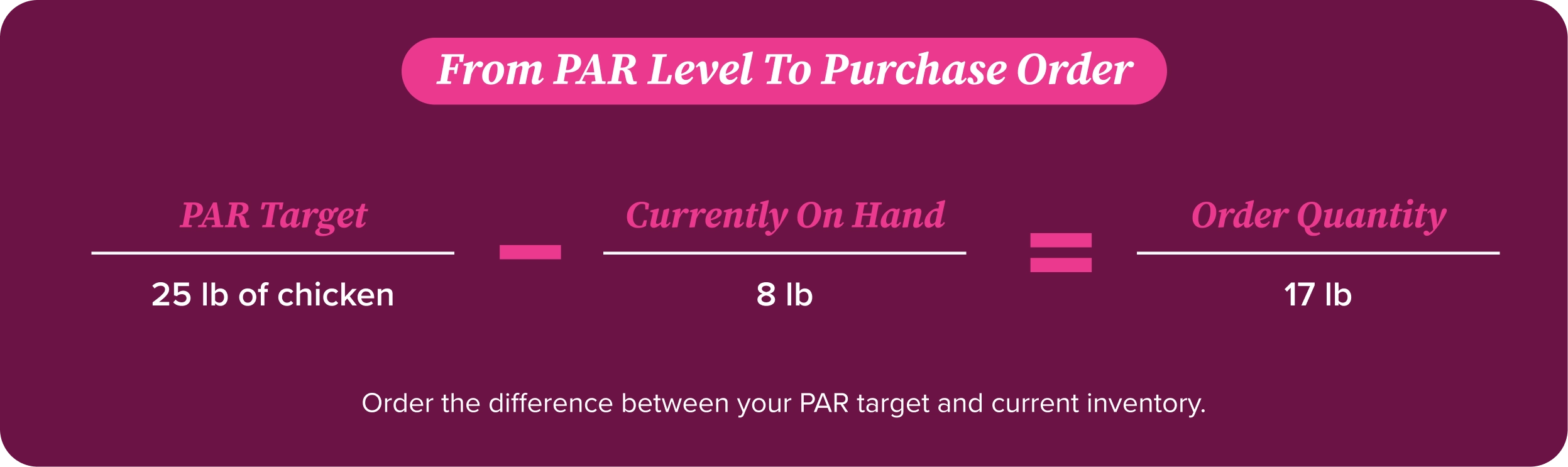
In this case, the restaurant would target 25 pounds of chicken for each delivery cycle. If an inventory count shows 8 pounds remaining before the next order, the operator would order 17 pounds to return inventory to PAR.
How Restaurant PAR Works
Once PAR levels are established, the basic process is straightforward: count current inventory, compare the amount on hand with the established PAR level, and order the difference.
The result is a repeatable purchasing process tied to actual usage instead of a manager’s memory or assumptions about what the restaurant might need.
Benefits of Restaurant PAR Levels
Prevents Stockouts During Busy Service
Running out of a high-volume ingredient can affect multiple menu items at once. A PAR level that includes appropriate safety stock gives the restaurant a buffer when sales exceed expectations or a delivery is delayed.
Reduces Food Waste and Overstocking
Overordering perishable products is a common mistake that can lead to food spoilage. Using actual consumption to establish PAR levels helps operators avoid routinely buying more product than the restaurant is likely to use.
Tracking inventory this way can also give operators a better understanding of cost of goods sold and where unnecessary inventory may be affecting food costs.
Improves Inventory Accuracy
Consistent PAR levels give managers a known target to compare against inventory counts. Unexpected differences can signal that usage has changed or that the restaurant needs to investigate waste, portioning, or other inventory discrepancies.
Supports Better Purchasing Decisions
PAR levels give operators a starting point for determining how much to order, but quantity is only part of the purchasing decision. Supplier schedules and changing ingredient costs also affect what restaurants ultimately spend.
Connecting inventory needs with purchasing and invoice data gives operators greater visibility into both the amount of product they are buying, and what they are paying for it.
Helps Control Food Costs and Increase Profitability
Every product that spoils or goes unused adds to a restaurant’s food costs. Buying items before they are needed can also put pressure on already-tight margins.
Consistent PAR management helps operators limit excess purchasing and make inventory decisions that reflect actual sales. Tracking those decisions alongside food cost provides a better view of how purchasing affects profitability.
How to Calculate Restaurant PAR Levels
- Track average inventory usage. Review sales reports and inventory counts for at least two to four weeks to establish typical usage. A longer period is even more useful for items with more demand fluctuation.
- Determine supplier lead time. Know how frequently each supplier delivers and how much time typically passes between placing an order and receiving it. An ingredient delivered once a week requires a different stocking strategy than one delivered twice a week.
- Add safety stock. Build in enough additional product to cover reasonable changes in demand or a potential delivery delay without routinely creating excess inventory.
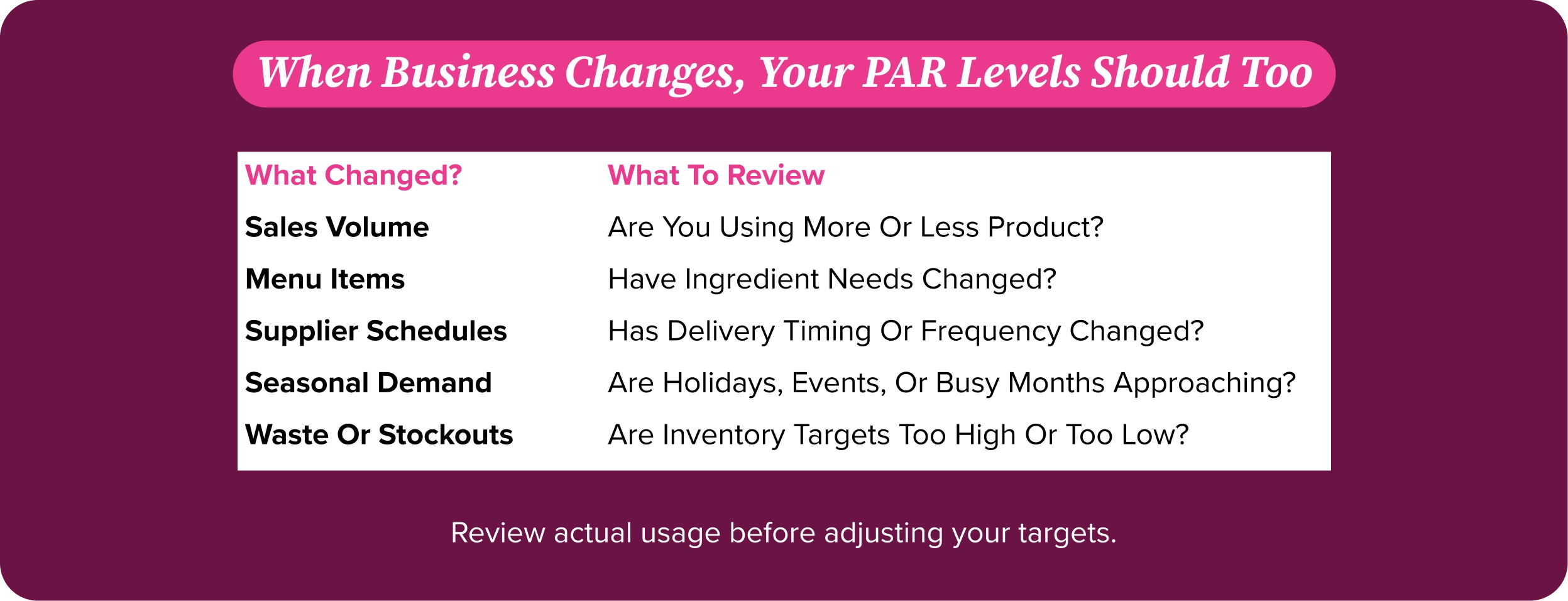
- Review and adjust PAR levels regularly. PAR is not a one-time calculation. Sales volume, menus, supplier schedules, and other operating conditions change. Inventory targets can—and should—change with them.
Best Practices for Managing Restaurant PAR Levels
Monitor Inventory Daily
Daily checks of high-volume or menu-critical ingredients can help managers spot potential shortages before they affect service. Not every item requires the same level of attention, so operators can prioritize products that turn quickly or affect multiple menu items.
Review Sales Trends Regularly
PAR levels should reflect what customers are actually ordering. Reviewing sales and usage data weekly or biweekly can show when an established target no longer reflects current demand.
Update PAR Levels for Seasonal Demand
A PAR level that works during a restaurant’s slow season may not work during its busiest months. Holidays, local events, and other predictable changes in demand should be reflected in inventory targets.
Standardize Inventory Counting Procedures
PAR data is only useful when the inventory counts behind it are consistent. Use the same units of measurement and counting procedures every time so comparisons are meaningful.
Use Real-Time Inventory Management Software
Inventory software can reduce the time operators spend compiling information manually, which makes purchasing, usage, and food cost data easier to review. Better visibility also makes it easier to identify changes that may require adjustments to established PAR levels.
Common Restaurant PAR Mistakes to Avoid
Setting the Same PAR Level for Every Item
Not all inventory moves at the same rate. A highly perishable ingredient used throughout the menu has different stocking requirements than a shelf-stable product with predictable usage.
Ignoring Sales and Usage Trends
Historical usage provides a starting point, but it’s not a permanent answer. If sales patterns change but PAR levels don’t, operators can end up consistently over- or under-ordering.
Failing to Update PAR Levels
New menu items, supplier changes, and shifts in demand can disrupt PAR levels. Regular reviews help keep inventory targets aligned with current operations.
Ordering Based on Guesswork
Ordering the same amount out of habit can create excess inventory when demand falls, and shortages when it rises. PAR gives operators a repeatable benchmark for making purchasing decisions.
Relying on Manual Inventory Tracking
Spreadsheets and paper counts require managers to compile and compare information manually. Digital inventory systems can bring purchasing and inventory information together and reduce the administrative work involved in monitoring PAR levels.
How BEP Back Office’s Inventory Software Simplifies PAR Management
Back Office brings inventory control, purchasing information, recipe costing, and operational reporting together so operators can see more than the quantity of product on the shelf.
Connecting inventory with invoice and purchasing data also provides context that a PAR number alone does not. An operator may be hitting the right inventory target while ingredient prices are rising, or when purchasing patterns are increasing food costs. Access to current cost and usage information helps operators evaluate PAR levels as part of the restaurant’s larger financial picture.
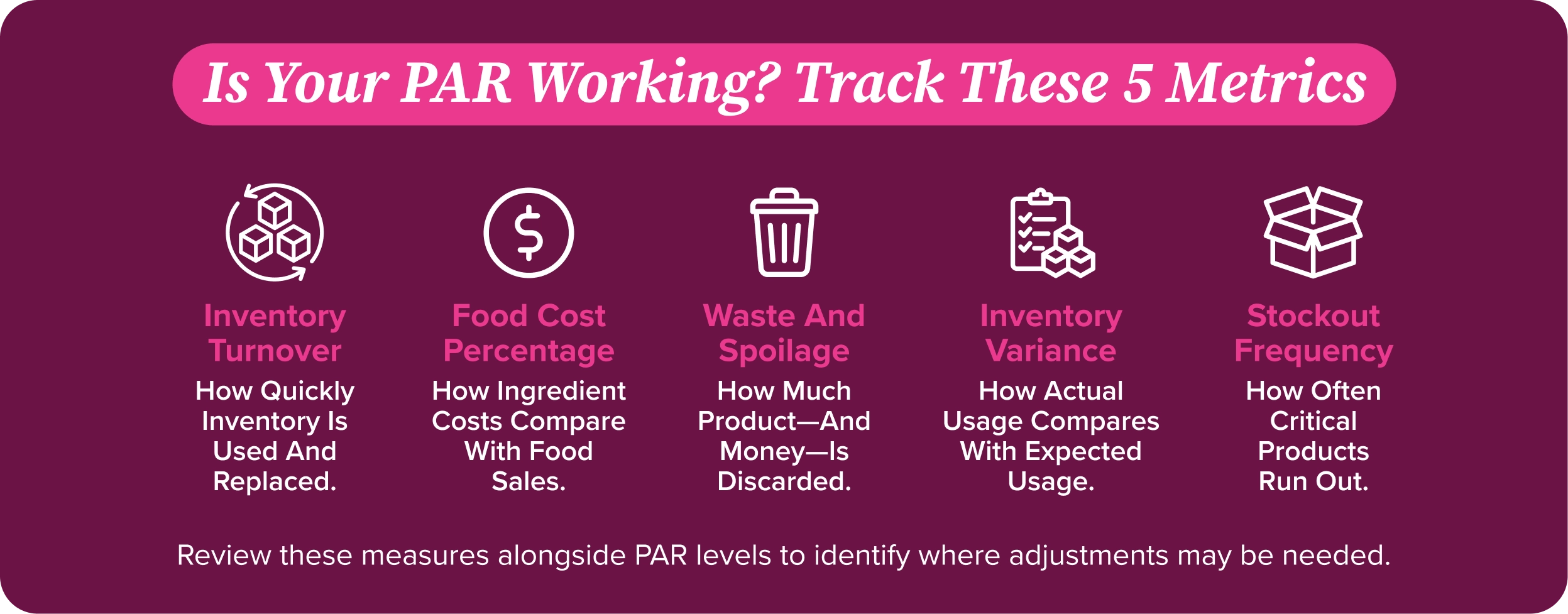
Restaurant PAR Metrics Every Operator Should Track
Inventory Turnover Rate
Inventory turnover measures how often a restaurant uses and replaces its inventory during a specific period. Tracking turnover helps identify products that are moving slower or faster than expected.
Food Cost Percentage
Food cost percentage compares the cost of ingredients with food sales. Monitoring it alongside PAR levels can help operators see whether inventory and purchasing decisions align with revenue.
Waste and Spoilage Rate
Tracking the amount and value of discarded products can reveal whether PAR levels are contributing to excess inventory. This is particularly important for perishable ingredients.
Inventory Variance
Inventory variance compares expected usage with actual usage. A recurring gap can indicate that PAR levels need adjustment. There may also be other operational issues that need attention.
Stockout Frequency
Tracking how often the restaurant runs out of menu-critical products can show whether PAR levels and safety stock are sufficient for actual demand.
Restaurant PAR Checklist
- Establish a PAR level for each inventory item based on actual usage.
- Track usage regularly to identify changes in demand.
- Review supplier delivery schedules and lead times.
- Use consistent units and procedures for inventory counts.
- Include appropriate safety stock for unexpected demand or delivery delays.
- Adjust PAR levels when sales patterns or operating conditions change.
- Monitor waste and spoilage for signs of overstocking.
- Review purchasing and invoice information alongside inventory quantities.
- Analyze inventory performance regularly and update PAR levels as needed.
Good inventory management comes down to having the right product in the right amount at the right time. PAR levels give operators a reliable starting point, but their real value comes from keeping them current.
Regularly reviewing usage, purchasing data, and costs helps keep inventory aligned with demand. This way, operators can protect margins and maximize every dollar spent. Interested in learning more about how Back Office can help simplify inventory management? Book a cost-free demo here.
FAQ’s
How do you calculate restaurant PAR levels?
Use this formula: PAR level = (Average weekly usage + Safety stock) ÷ Deliveries per week. For example, if you use 40 pounds of chicken weekly, add 10 pounds of safety stock, and receive two deliveries, your PAR level is 25 pounds.
Why are PAR levels important in restaurant inventory management?
PAR levels help you keep enough stock to meet demand without overbuying. They take the guesswork out of ordering, helping you avoid shortages, reduce waste, and keep food costs in check.
How often should restaurants review their PAR levels?
Review sales and usage trends weekly or biweekly to see whether your PAR levels still fit demand. Adjust when menus, delivery schedules, or seasonal sales change, and check high-volume ingredients daily.
What happens if PAR levels are set too high or too low?
Set them too high, and you risk spoilage and cash tied up on the shelf. Set them too low, and you could run out mid-service or need a last-minute order at a premium.
Can restaurant inventory software help manage PAR levels?
Yes. Back Office brings inventory, purchasing, and cost information together, making it easier to spot changes in usage and review your targets. That means less manual work and better-informed ordering decisions.
What is the difference between PAR level and safety stock?
Your PAR level is the total inventory target you aim to keep on hand. Safety stock is the extra cushion built into that target to cover unexpected demand or delivery delays—not a separate ordering target.