Restaurant owners depend on technology to keep track of their finances, inventory, employees, purchasing, and performance across their operations. As operations become more complex, selecting the right financial and back-office software becomes increasingly important for both independent operators and growing multi-location restaurant groups.
Back Office by Buyers Edge Platform and QuickBooks Online are two solutions restaurant operators may consider when looking for greater control over their financials. However, the platforms were built with very different purposes in mind.
QuickBooks Online is a general-purpose accounting platform used across a wide range of industries. Back Office is purpose-built for foodservice operators, bringing restaurant accounting together with inventory, purchasing, labor, recipe costing, and operational reporting.
In this comparison, we look at features, operational approach, integrations, pricing considerations, and overall fit to help restaurant operators evaluate which platform better aligns with the way they run their business.
Back Office by Buyers Edge Platform vs QuickBooks Overview
Back Office and QuickBooks Online both help businesses manage financial information, but their approaches differ significantly.
QuickBooks Online is primarily an accounting platform. It provides tools for bookkeeping, invoicing, bank reconciliation, financial reporting, and other core accounting functions. Its widespread adoption, established brand, and large ecosystem of integrations make it a familiar option for many businesses and accounting professionals.
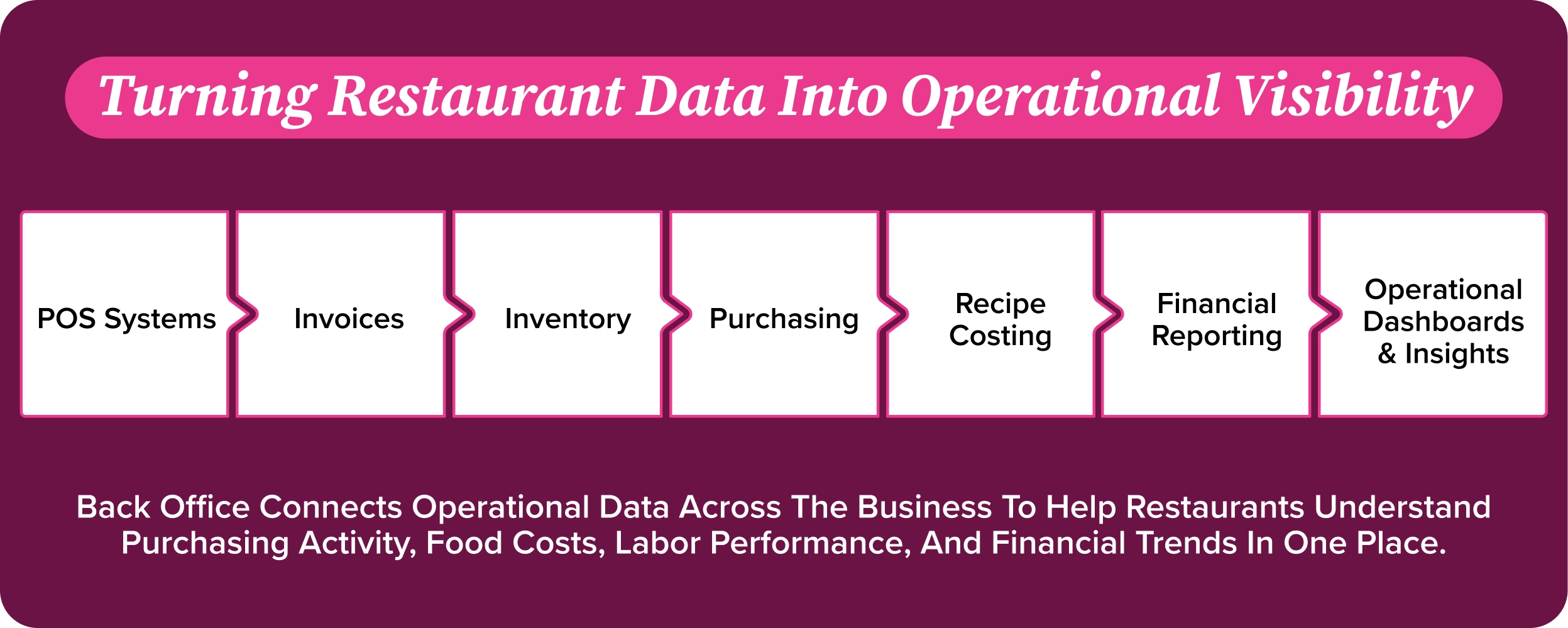
Back Office is designed specifically around restaurant operations. It connects accounting with inventory, purchasing, recipe costing, labor, payroll, POS data, and operational reporting to give operators a clearer picture of what is happening across their business.
For restaurants using QuickBooks, additional restaurant technology may be needed to manage functions such as inventory, recipe costing, purchasing, labor, or restaurant-specific operational reporting. That can create an environment where operators rely on multiple systems to understand the full financial and operational picture.
Back Office takes a more unified approach by bringing core restaurant back-office functions together within one platform.
For many independent restaurants and growing multi-unit groups, the conversation is therefore less about choosing an accounting system alone and more about determining how much of the restaurant operation they want their technology to connect.
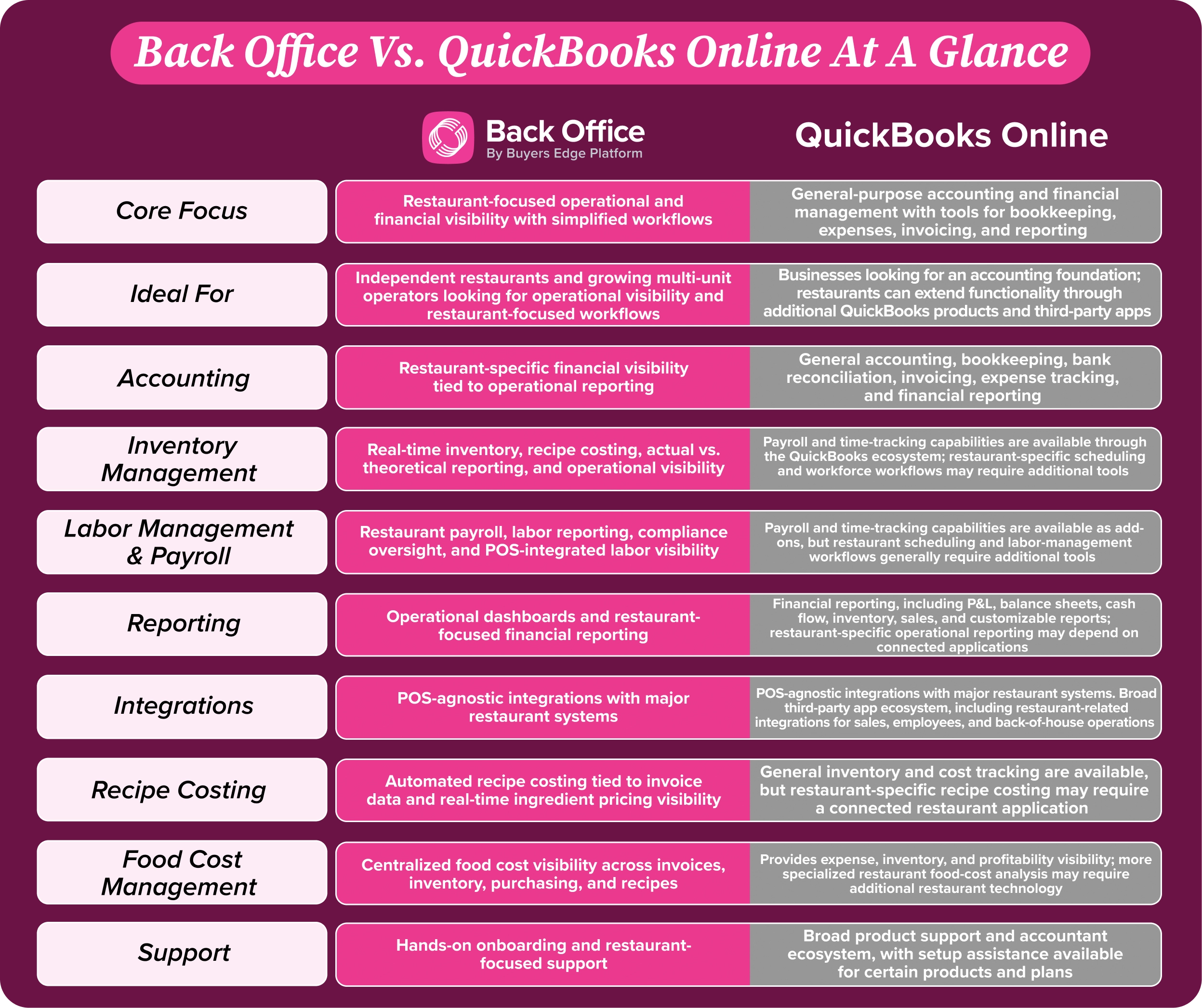
| Feature | Back Office | QuickBooks Online |
|---|---|---|
| Core Focus | Restaurant-focused operational and financial visibility with simplified workflows | General-purpose accounting and financial management with tools for bookkeeping, expenses, invoicing, and reporting |
| Ideal For | Independent restaurants and growing multi-unit operators looking for operational visibility and restaurant-focused workflows | Businesses looking for an accounting foundation; restaurants can extend functionality through additional QuickBooks products and third-party apps |
| Accounting | Restaurant-specific financial visibility tied to operational reporting | General accounting, bookkeeping, bank reconciliation, invoicing, expense tracking, and financial reporting |
| Inventory Management | Real-time inventory, recipe costing, actual vs. theoretical reporting, and operational visibility | Payroll and time-tracking capabilities are available through the QuickBooks ecosystem; restaurant-specific scheduling and workforce workflows may require additional tools |
| Labor Management & Payroll | Restaurant payroll, labor reporting, compliance oversight, and POS-integrated labor visibility | Payroll and time-tracking capabilities are available as add-ons, but restaurant scheduling and labor-management workflows generally require additional tools |
| Reporting | Operational dashboards and restaurant-focused financial reporting | Financial reporting, including P&L, balance sheets, cash flow, inventory, sales, and customizable reports; restaurant-specific operational reporting may depend on connected applications |
| Integrations | POS-agnostic integrations with major restaurant systems | POS-agnostic integrations with major restaurant systems. Broad third-party app ecosystem, including restaurant-related integrations for sales, employees, and back-of-house operations |
| Recipe Costing | Automated recipe costing tied to invoice data and real-time ingredient pricing visibility | General inventory and cost tracking are available, but restaurant-specific recipe costing may require a connected restaurant application |
| Food Cost Management | Centralized food cost visibility across invoices, inventory, purchasing, and recipes | Provides expense, inventory, and profitability visibility; more specialized restaurant food-cost analysis may require additional restaurant technology |
| Support | Hands-on onboarding and restaurant-focused support | Broad product support and accountant ecosystem, with setup assistance available for certain products and plans |
Download a copy of the comparison table here
Key Software Capabilities
Accounting
Both platforms support accounting, but they approach it from different perspectives.
QuickBooks Online is a general-purpose accounting platform used by businesses across many industries. Its strengths include bookkeeping, invoicing, bank reconciliation, financial reporting, and a familiar accounting environment used by many accountants and bookkeepers.
Back Office approaches accounting through the lens of restaurant operations.
Rather than separating accounting from what is happening inside the restaurant, Back Office connects financial information with purchasing, inventory, labor, POS, and other operational data. Restaurant-specific reporting helps operators see how day-to-day decisions affect profitability.
That distinction can become increasingly important as restaurants grow. General financial statements tell operators what happened financially, while restaurant-focused reporting can help provide additional context around why costs or margins changed.

Accounts Payable Automation
Both platforms can help reduce manual accounting work, but their accounts payable capabilities are structured differently.
QuickBooks Online supports general invoicing, bookkeeping, and bill-management workflows, with additional functionality available through its broader ecosystem of applications and services.
Back Office connects invoice activity directly to restaurant purchasing, inventory, accounting, and cost reporting workflows.
This allows invoice information to do more than simply enter the accounting record. Purchasing activity and vendor pricing can contribute to the operational picture operators use to monitor costs and performance.
For restaurants evaluating AP technology, the distinction is whether they primarily need general accounting automation or want invoice data integrated into a broader restaurant cost-management workflow.
Inventory Management
Inventory management represents one of the clearest differences between Back Office and QuickBooks Online.
QuickBooks is primarily an accounting platform rather than a restaurant inventory management system. Restaurants that need capabilities such as ingredient-level inventory management, recipe costing, food cost analysis, and restaurant purchasing workflows may need to connect QuickBooks with additional restaurant software.
Back Office integrates inventory directly with restaurant accounting, purchasing, recipe costing, and operational reporting.
This allows operators to monitor inventory alongside the financial data affected by it, helping teams identify waste, understand food cost movement, track purchasing patterns, and maintain greater consistency across the operation.
For restaurants trying to understand what is happening between a vendor invoice and the resulting food cost, having these functions connected can reduce the need to piece information together across separate systems.
Labor Management
QuickBooks Online can support payroll and related financial functions, while restaurants may use additional applications for scheduling, workforce management, and restaurant-specific labor reporting.
Back Office incorporates labor and scheduling into the broader restaurant back-office environment while connecting labor information with POS and financial data.
This gives operators greater visibility into labor performance alongside sales, food costs, and other operating expenses.
For restaurant operators, that connection matters because labor is not simply an accounting expense. It is one of the largest controllable costs in the business and needs to be understood in the context of restaurant performance.
Reporting & Analytics
QuickBooks Online provides established financial reporting capabilities, including accounting reports designed to help businesses understand their financial position.
Back Office emphasizes operational reporting designed specifically for restaurant decision-making.
Instead of viewing accounting data in isolation, operators can evaluate financial performance alongside food costs, labor, purchasing, inventory, and other restaurant metrics.
This creates a more restaurant-specific view of the P&L and helps operators identify the operational factors contributing to changes in profitability.
For a restaurant operator, that can mean moving from simply seeing that costs increased to having greater visibility into where those changes originated.
Integrations
Both platforms offer integrations, although their ecosystems serve different purposes.
QuickBooks Online has a large third-party application ecosystem and is widely recognized by accountants, bookkeepers, and financial professionals. Restaurants can connect QuickBooks with additional technology to build out a more restaurant-specific technology stack.
Back Office integrates with leading restaurant systems, including POS platforms such as Toast, Square, Clover, and Lightspeed.
Rather than competing with QuickBooks on the sheer size of its application ecosystem, Back Office focuses on connecting restaurant technology and operational data within a restaurant-focused workflow.
Restaurants that already work with an accountant familiar with QuickBooks do not necessarily have to abandon that relationship either. Back Office can export information to QuickBooks or provide accountants with access while operators use restaurant-specific tools to manage day-to-day performance.
Pricing
Pricing is one area where comparing Back Office and QuickBooks Online based solely on the initial subscription price can be misleading.
QuickBooks Online offers multiple subscription levels, making its entry-level accounting options accessible to businesses that primarily need core financial functionality. However, restaurants may need additional software for capabilities such as inventory management, recipe costing, labor management, scheduling, or other restaurant-specific workflows.
As those tools are added, the restaurant’s total technology cost may extend beyond the price of its QuickBooks subscription.
Back Office uses a subscription-based model with pricing that varies based on the functionality selected and the needs of the restaurant operation. Because it combines multiple restaurant back-office functions within one platform, operators should compare the total functionality and technology stack required rather than looking only at the starting subscription price of either product.
Software pricing, promotions, and package structures also change over time. Restaurants should contact each provider directly for current pricing and evaluate what is included, what requires additional software, implementation requirements, and overall total cost of ownership.
Pros and Cons
Back Office Pros
- Purpose-built for restaurant and foodservice operations
- Restaurant-specific accounting and operational reporting
- Integrated inventory, purchasing, recipe costing, labor, and financial visibility
- Real-time insight into food costs and operational performance
- Restaurant-focused P&L and reporting workflows
- POS integrations with leading restaurant systems
- Hands-on onboarding and restaurant-focused support
- Ability to connect operational and financial data within one platform
- Designed for independent restaurants and growing multi-unit operators
Back Office Considerations
- Smaller overall brand recognition than QuickBooks
- Smaller third-party accounting ecosystem than QuickBooks
- Enterprise and franchise-scale functionality may differ from the needs of very large restaurant organizations
- Operators primarily looking for basic bookkeeping may not require the breadth of restaurant-specific functionality available
QuickBooks Pros
- Well-established and widely recognized accounting platform
- Familiar to many accountants and bookkeepers
- Strong core bookkeeping and general accounting capabilities
- Large third-party application and integration ecosystem
- Multiple subscription levels for businesses with different accounting needs
- Established invoicing, bank reconciliation, and financial reporting tools
- Can serve as a familiar financial foundation for restaurants already using other operational systems
QuickBooks Considerations
- Built as a general-purpose accounting platform rather than specifically for restaurants
- Restaurant inventory management is not a core native capability
- Recipe costing and restaurant-specific food cost workflows may require additional software
- Labor, scheduling, and other restaurant operational functions may require separate applications
- Building a complete restaurant back-office technology stack can involve multiple systems, integrations, and logins
- Restaurant-specific operational insights may require data to be brought together from multiple tools
- Total technology cost can increase as restaurant-specific applications are added
Questions To Ask When Comparing Restaurant Back Office Software
- Does the platform manage both operational and financial workflows?
- Will you need separate accounting software?
- Does it provide payroll and labor management?
- Does it integrate with your existing POS and restaurant technology?
- How much operational visibility do you need beyond invoice processing?
- Will the platform scale as your restaurant grows?
The Right Solution Depends On Your Operational Needs, Technology Stack, And Long-Term Growth Goals.
Final Verdict
Both Back Office and QuickBooks Online can play a role in restaurant financial management, but they were designed to solve different problems.
QuickBooks Online is a strong general accounting platform with broad brand recognition, an extensive application ecosystem, and a familiar environment for accountants and bookkeepers.
For restaurants primarily looking for bookkeeping, financial reporting, invoicing, and other traditional accounting functions, that familiarity can be valuable.
Back Office takes a different approach.
Rather than treating restaurant accounting as a standalone function, Back Office connects financial information with inventory, purchasing, recipe costing, labor, POS data, and operational reporting.
For independent restaurants and growing multi-unit operators, this can provide a more complete view of what is happening inside the business without requiring operators to piece together restaurant performance across several separate applications.
Ultimately, the decision should not be based on accounting functionality alone.
Operators should consider how many systems their teams need to manage, how easily operational and financial data can be connected, what level of restaurant-specific visibility they need, and whether their technology can continue supporting them as their operations become more complex.
FAQs
Is Back Office better than QuickBooks for restaurants?
The better fit depends on what the restaurant needs from its technology.
QuickBooks Online provides established general accounting capabilities and may be sufficient for restaurants primarily looking for bookkeeping and financial reporting.
Back Office is designed specifically for restaurant operations and connects accounting with inventory, purchasing, recipe costing, labor, POS data, and operational reporting. Restaurants looking for a more unified restaurant management environment may benefit from having those functions connected within one platform.
Can QuickBooks handle multi-location restaurant operations?
QuickBooks can support businesses with multiple locations, but restaurant operators may need additional applications or processes to manage restaurant-specific functions across those locations.
Inventory, recipe costing, scheduling, purchasing, and operational performance reporting may require additional technology depending on the restaurant’s needs.
Back Office is designed to give restaurant operators visibility into financial and operational performance across their business while connecting key restaurant data within a centralized environment.
Why do growing restaurants move beyond QuickBooks?
As restaurants grow, their technology needs often extend beyond traditional accounting.
An operator may initially need bookkeeping, invoicing, and financial statements. Over time, that same business may need more detailed visibility into inventory, ingredient costs, vendor pricing, labor, purchasing, recipe profitability, and location-level performance.
Restaurants can add separate tools around QuickBooks to support those needs. Another approach is to use a restaurant-focused back-office platform that connects those functions within a more unified workflow.
The right approach depends on the complexity of the operation and how much restaurant-specific visibility the team needs.
Which platform offers stronger cost control automation?
The platforms approach cost control differently.
QuickBooks Online provides financial and accounting tools that help businesses track expenses and understand overall financial performance.
Back Office connects restaurant cost data across purchasing, invoices, inventory, recipes, labor, and financial reporting. This can give operators more direct visibility into the operational factors influencing food and labor costs.
For restaurants, that means cost management can become part of the daily operational workflow rather than something evaluated only through financial statements.
Is Back Office more scalable?
Both platforms can support growing businesses, but they scale in different ways.
QuickBooks offers multiple accounting plans and a large ecosystem of third-party applications that businesses can use as their needs expand.
Back Office is designed to help restaurant operators scale restaurant-specific workflows by connecting accounting, inventory, purchasing, labor, POS data, and reporting within one platform.
For growing restaurant groups, the question is often not simply whether software can accommodate additional locations. It is whether the technology can give operators consistent visibility across those locations without creating an increasingly fragmented technology stack.