
A busy dining room is no place to discover that a modifier never reached the check or yesterday’s promotion is still running. Restaurant billing should keep service moving while giving you numbers you can trust. That takes more than a fast card terminal. It takes clean menu data, clear staff procedures, and a reliable way to match sales with money received. Whether you run one neighborhood spot or several locations, these practices help tighten accuracy without slowing down your team.
What Does “Restaurant Billing” Mean?
Restaurant billing is the process of turning a guest’s order into an accurate check, collecting payment, and recording the transaction. It covers item prices, modifiers, discounts, taxes, applicable charges, tips, and receipts.
The work continues after the guest leaves. Operators still need to match payments and deposits, explain adjustments, and close out the day. Delivery adds another layer because platform payouts can include fees and other deductions. Vendor invoicing sits on the purchasing side, not the guest checkout side, but belongs in the broader financial workflow. Keeping those records connected helps you understand what came in and what went out.
Types of Restaurant Billing
Different service channels create different billing requirements. Set up each workflow deliberately rather than expecting one checkout routine to handle everything.
Dine-In Billing
Dine-in billing connects orders to tables, seats, or tabs. Servers need to transfer checks, add modifiers, and split payments without losing items. Establish when checks can be reopened and who approves corrections, especially after a shift changes hands.
Takeout and Counter Billing
At the counter, speed depends on clear item selection and quick payment confirmation. Capture packaging charges where applicable, identify prepaid orders, and distinguish an order being accepted from a payment being completed. That distinction helps prevent duplicate collection during pickup.
Delivery Billing
Delivery orders may involve menu markups, platform promotions, delivery charges, and settlement deductions. Keep guest charges separate from platform fees. Match each payout to its underlying orders instead of treating the bank deposit as your sales total.
Vendor Invoicing
Vendor invoices record what your restaurant owes suppliers. They are accounts payable, not guest checks. Compare invoices with purchase orders and receiving records where available, investigate price or quantity differences, and approve payment through a defined workflow. Consistent records support purchasing oversight across locations.
What Should a Restaurant Billing Process Include?
A good billing process does more than get the bill to the table. It helps your team record orders accurately, take payments, and check that the day’s numbers add up. Everyone should know who handles each step—and who takes over when something goes wrong.
Order Entry
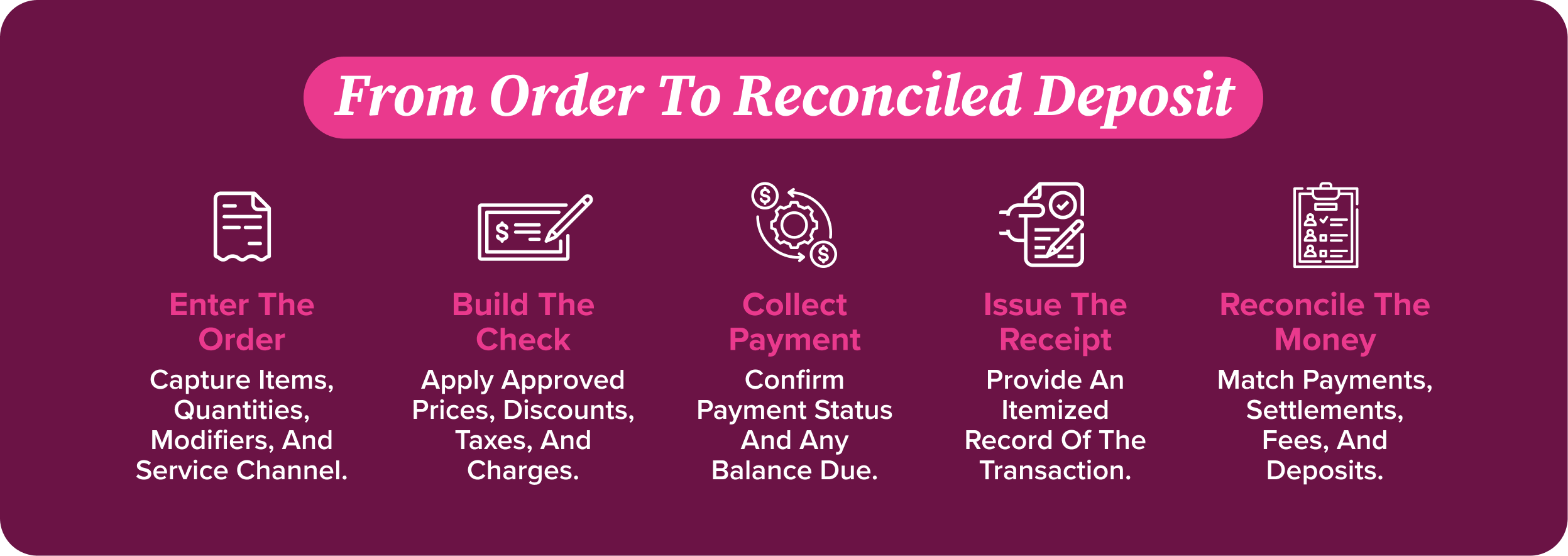
Start with the basics: enter the right items, quantities, and any changes the guest has requested. Mark whether the order is for dine-in, takeaway, or delivery, too. If an item is already on the menu, use that listing rather than typing in a price. Seat numbers or clear order references save a lot of guesswork when someone needs to change the bill later.
Menu and Price Management
Keep one approved price list so staff aren’t working from different versions. If delivery prices differ from dine-in prices, make those rules clear in the system. Update prices before service starts and check that extras and substitutions add up correctly. For restaurants with several locations, spell out which prices head office sets and which ones local managers can change.
Taxes and Service Charges
Set up taxes and service charges to match the rules where you operate, and make sure guests can see any charges before they pay. A required service charge isn’t the same as a tip, so keep the two separate. Check with a qualified tax or payroll adviser about how each should be handled rather than assuming the same rules apply.
Discounts and Promotions
Staff should know what an offer covers, when it expires, and whether it can be used with another deal. Set approval limits so there’s no confusion about who can authorize a discount. Try each promotion before it goes live, including through your website and delivery channels. For manual discounts, ask staff to record a short reason. That helps managers tell a planned offer from an adjustment made after a complaint.
Bill Splitting
Guests may want to pay by seat, by item, or simply divide the total. Make sure staff know which options your system supports and how it handles shared dishes, taxes, and service charges. Before closing the check, look at the balance still due. It’s easy to miss a small amount when several people are paying separately.
Payment Processing
Offer payment methods that make sense for your guests, and give staff clear instructions for declined payments or a lost connection. A failed transaction shouldn’t leave anyone guessing whether the bill has been paid. Payment security belongs in the everyday checkout routine: use securely configured payment tools and review the PCI DSS requirements that apply to your business with your provider.
Receipts and Invoices
Give guests an itemized record of what they bought, along with discounts, taxes, service charges, and payment status. Add any business details required under local rules. Where appropriate, let guests choose whether to receive an email receipt. Staff should also be able to find an old receipt without seeing or sharing guest information they don’t need.
End-of-Day Reconciliation
At closing, compare paid checks with totals for each payment method, cash in the till, refunds, and the payment processor’s records. Then check that deposits arrive in line with the processor’s settlement schedule. If something doesn’t match, assign someone to investigate and follow up. Don’t let an unexplained difference roll into the next day’s figures.
Why Accurate Restaurant Billing Matters
A bill might be the last thing guests see, but it can change how they remember the visit. For the restaurant, it’s also the record of what was sold and what was paid. Getting it right helps avoid awkward conversations at the table and makes the numbers easier to trust.
Prevent Revenue Leakage
An extra side, a drink refill that should have been charged, or a discount nobody approved—it doesn’t take much for a bill to fall short. A one-off mistake may be small, but the same mistake across several shifts can add up. Keeping bills accurate helps you spot what’s being missed. If a particular adjustment keeps appearing, check it against the orders rather than writing it off as another minor difference.
Reduce Billing Errors
Nobody wants to finish a good meal by querying the bill. And for staff, fixing a wrong price means stopping to check the order, explain the mistake, and update the records. Keeping menu prices current and giving the team a straightforward way to correct errors can save everyone some hassle. It also leaves staff with more time to look after guests.
Improve Financial Reporting
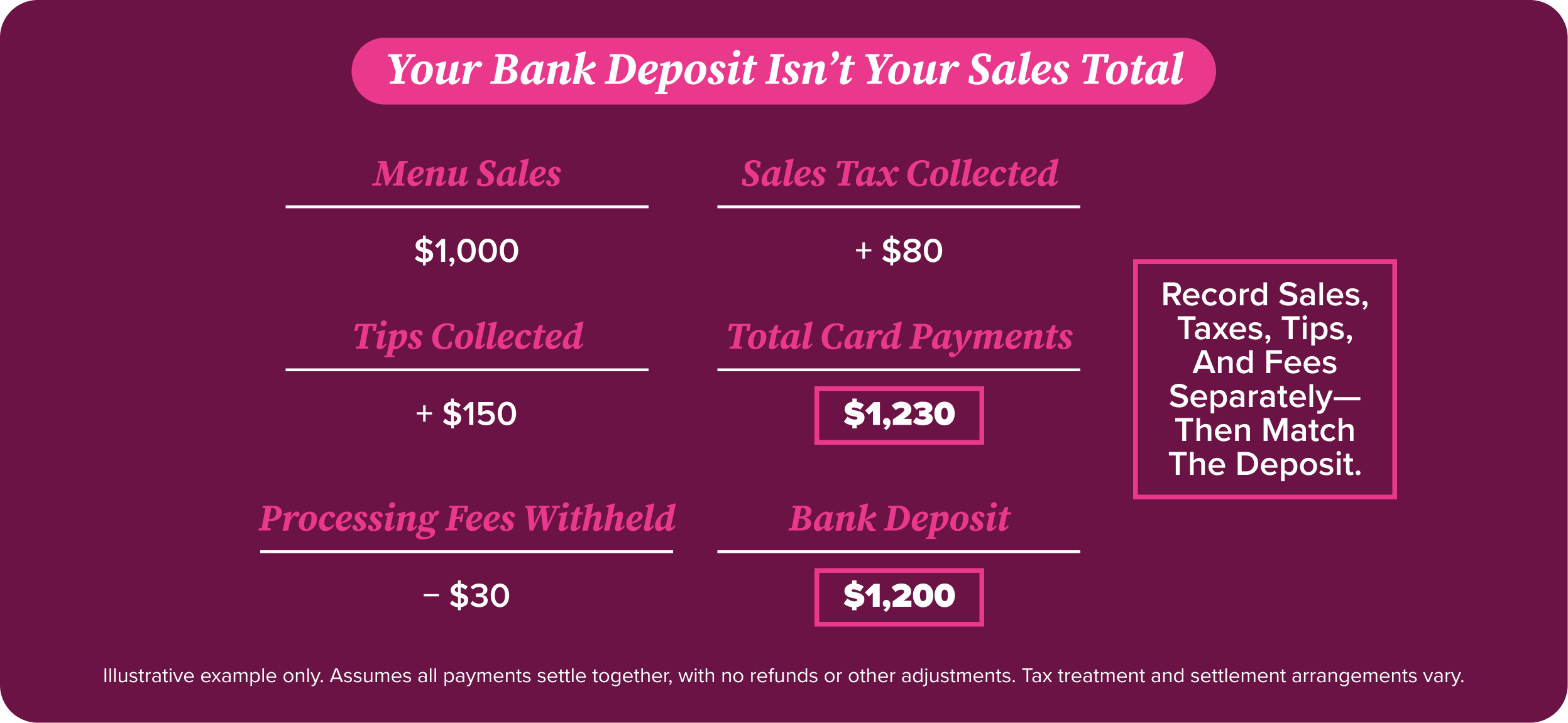
The money that lands in your bank account doesn’t tell the whole story. Card payments may arrive together, with processing fees already taken out. Clear billing records let you see sales, taxes, tips, fees, and refunds separately, so you know what you’re actually looking at. That makes it easier to compare locations or work out how dine-in, takeaway, and delivery are performing.
Speed Up the Checkout Process
Once guests ask for the bill, they usually don’t want a long wait while someone fixes it. Getting the check right the first time means fewer changes and fewer calls for a manager. Guests can pay when they’re ready, and staff can get back to the floor. It’s not about hurrying anyone out the door—just making sure a billing mix-up doesn’t spoil the end of a good visit.
Best Practices to Improve Restaurant Billing Accuracy
Better restaurant billing starts with repeatable controls, not more paperwork. Focus on changes that reduce errors at the source and make exceptions easy to investigate.
Standardize Billing Procedures
Write short procedures for opening checks, transferring tables, applying discounts, and closing payments. Train staff using realistic scenarios, such as a shared appetizer or a declined split payment. Across locations, keep core rules consistent while documenting legitimate local differences.
Automate Tax Calculations
Use configured tax rules instead of asking staff to calculate amounts manually. Automation still needs oversight: verify rates, taxable items, service channels, and effective dates. Recheck settings after menu updates or regulatory changes, and have a qualified adviser resolve uncertain treatment.
Integrate Billing With POS
Connect restaurant billing records with the systems used for sales and financial reporting where supported. Confirm what actually syncs: items, modifiers, tenders, refunds, and location identifiers. Test the connection before rollout. An integration that omits adjustments can create a cleaner-looking but incomplete picture.
Automate Payment Reconciliation
Use matching rules to connect transactions, settlements, fees, and bank deposits where your tools support them. Route unmatched items to an exception queue with an owner. Account for settlement delays, weekends, and deductions before labeling a difference as missing revenue.
Control Refunds, Voids, and Discounts
Limit permissions by role and require meaningful reason codes. Set approval thresholds that match your operation without making every correction a bottleneck. Review unusual patterns by employee, shift, and location. An exception deserves context, not an automatic assumption of misconduct.
Review Billing Reports Regularly
Check daily exceptions and review broader trends weekly. Watch for repeated price overrides, reopened checks, failed payments, and aged reconciliation differences. Investigate the underlying workflow, then update training or settings. Give managers a manageable review routine they can actually sustain.
Signs Your Restaurant Billing Process Needs an Upgrade
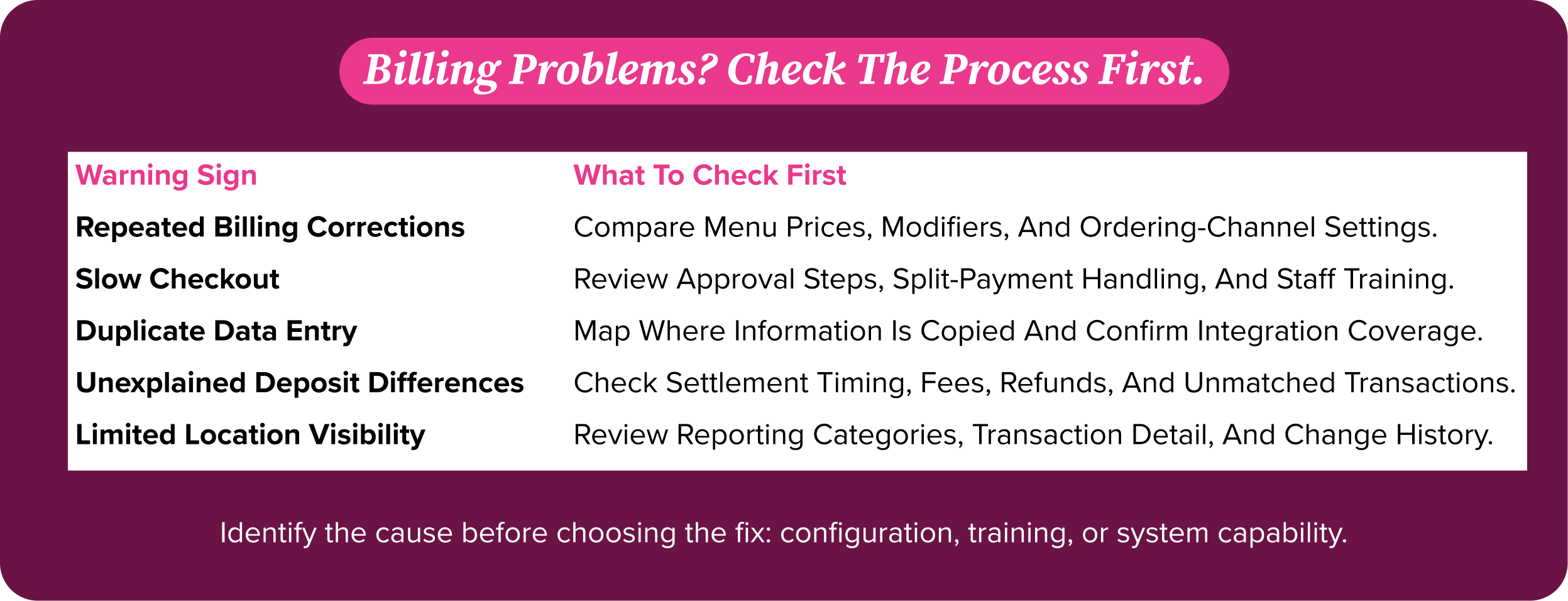
Occasional corrections are normal. Repeated workarounds are a signal to investigate. These warning signs help identify whether your restaurant billing setup needs better configuration, stronger training, or a more capable system.
Frequent Billing Errors
If guests regularly question prices or staff repeatedly correct the same modifiers, look beyond individual mistakes. Compare the menu, ordering channels, and POS configuration. A recurring error often starts with inconsistent data or an unclear rule, not a careless employee.
Slow Checkout Times
Watch what happens between a guest requesting the check and completing payment. Repeated manager approvals, awkward splits, or unclear terminal prompts can extend that gap. Observe a busy shift before deciding whether new hardware, simpler permissions, or staff coaching will help.
Manual Data Entry
Typing sales totals into spreadsheets or reentering invoices creates extra opportunities for mistakes. Map where information is copied and why. Prioritize eliminating duplicate entry that affects financial accuracy, while keeping review controls around imported data and any corrections.
Reconciliation Issues
Unexplained differences, missing settlement details, and growing backlogs suggest the closeout process is not keeping pace. Separate timing differences from genuine exceptions. If managers cannot trace a deposit to the transactions behind it, reporting needs attention before expansion adds more complexity.
Limited Billing Visibility
You should not need five messages to learn why a location’s refunds increased. If reports arrive late or use inconsistent categories, comparisons become unreliable. Look for accessible transaction detail, location-level reporting, and a clear record of who changed what and when.
How BEP Back Office Automates Restaurant Billing
Restaurant billing does not end when the POS closes a check. The back-office priority is turning transaction records into dependable financial information. When evaluating BEP Back Office, ask how your sales data, payment records, and vendor invoices can move through one coordinated workflow. Confirm supported POS connections, reconciliation capabilities, approval controls, and reporting for your locations before planning a rollout. Start with the task costing managers the most time, then establish who reviews exceptions. The right setup should reduce duplicate entry and make differences easier to resolve, while keeping your team accountable for approvals, corrections, and the final financial review.
Contact Back Office or request a demo to explore how your team can reduce manual billing follow-up and get a clearer view of sales, payments, and exceptions across locations.
FAQ’s
What is restaurant billing software?
Restaurant billing software calculates guest checks, applies configured taxes and discounts, records payments, and produces receipts. Depending on the product, it may also support split checks, reporting, and financial integrations. Choose tools that fit your service channels, payment requirements, and daily closeout workflow—not just the fastest checkout screen.
What’s the difference between restaurant billing and a POS system?
Restaurant billing is a workflow: calculating charges, collecting payment, and recording what happened. A POS system is a tool that usually handles billing alongside order entry and other service functions. Back-office systems work with transaction data for financial oversight. Features overlap, so confirm each product’s role before buying.
How does restaurant billing work?
Staff or guests enter an order, and the system applies prices, modifiers, discounts, taxes, and applicable charges. The guest reviews the check and pays. Afterward, your team records adjustments, checks tender totals, and matches settlements and deposits. Delivery platforms and split payments can introduce additional reconciliation steps.
How can restaurants reduce billing errors?
Keep menu data current, standardize billing steps, and restrict sensitive adjustments by role. Test taxes and promotions before service. Train employees on split checks, refunds, and failed payments. Review exceptions regularly and fix recurring causes. For multiple locations, assign clear ownership of shared settings and local changes.
How does automation improve restaurant billing?
Automation reduces repetitive calculations, duplicate entry, and manual matching where integrations support those tasks. It can also highlight exceptions sooner. It does not replace good configuration or financial review. Check connection coverage, monitor failed imports, and give someone responsibility for investigating unmatched transactions and approving corrections before closing the books.