

After the last guest leaves and the front doors are locked, your restaurant team still has important work to do before heading home. Small missed closing steps – even unintentional ones – can create problems for the next shift (and even the rest of the week). Uncovered food can lead to wasted product and unexpected stock shortages, while a messy dining room can delay opening and lead to unhappy customers the next morning.
Closing is often a restaurant’s most financially vulnerable moment because of what typically gets skipped. For owner/operators who can’t oversee every close, a thorough restaurant closing checklist helps keep those operational misses from becoming habits. A good closing checklist gives your team clear responsibilities and a nightly routine to follow, even when you’re offsite.
What Is a Restaurant Closing Checklist?
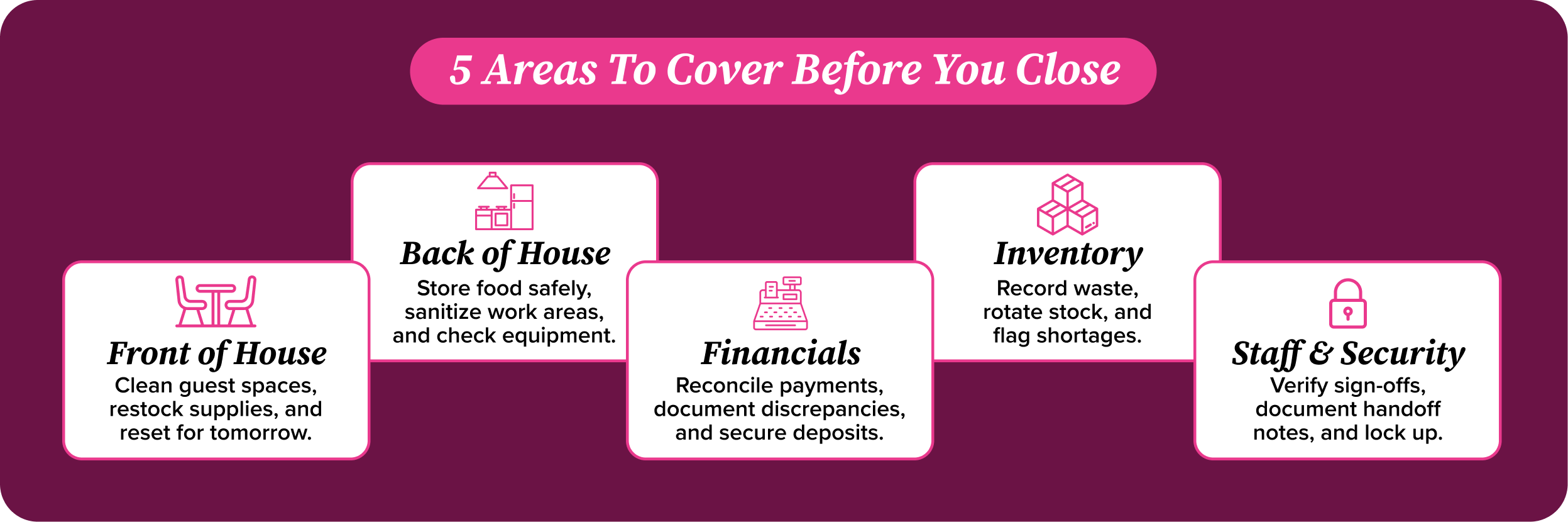
A restaurant closing checklist is a standardized list of end-of-day tasks organized by operational area. Front-of-house (FOH) tasks cover dining areas, service stations, and guest-facing spaces, while back-of-house (BOH) tasks address kitchen cleaning, food storage, and equipment. Financial tasks include reconciling cash and recording expenses, and security tasks ensure funds, inventory, and the building are secured.
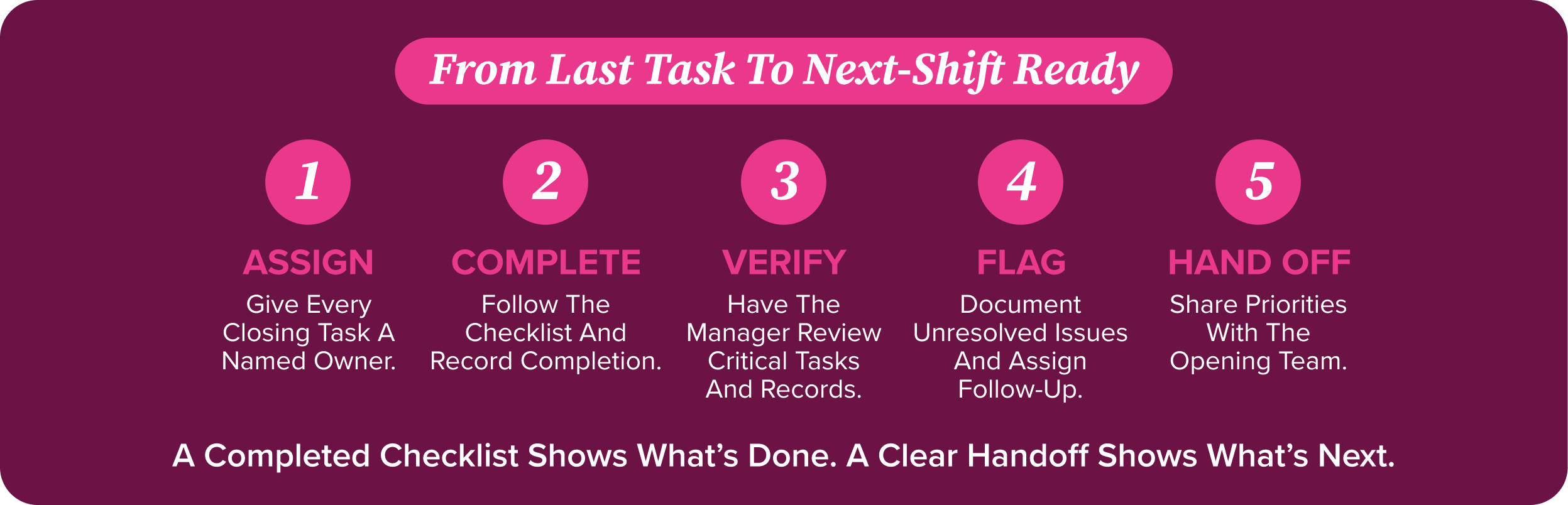
Beyond organizing the work, the checklist establishes who completes each task and who verifies it. It also provides a connection between closing and opening teams, giving the next shift a clear record of completed work, unresolved issues, and priorities needing attention.
Why a Restaurant Closing Checklist Matters
Small oversights at closing can turn into wasted food, cash shortages, and extra work for the next morning’s opening crew. A consistent restaurant closing checklist helps teams catch those gaps before they affect the next shift or the bottom line.
Maintains Food Safety and Compliance
A closing checklist prompts employees to complete temperature logs, follow sanitation protocols, and verify that closing procedures align with applicable health code requirements.
Prevents Inventory Loss and Food Waste
Tasks for checking end-of-day counts, proper storage, and consistent FIFO rotation help teams identify missing inventory and use older stock before it spoils.
Improves Cash Handling Accuracy
By standardizing procedures for drawer counts, POS reconciliation, and deposit preparation, closing managers can catch discrepancies early and ensure every penny is accounted for.
Prepares the Restaurant for the Next Business Day
Restocking essential supplies, checking equipment readiness, and recording shift notes give the opening team what they need to start the next shift on the best footing, enabling them to provide excellent service.
Creates Accountability Across Restaurant Teams
Assigning clear task ownership and requiring employee sign-offs improves accountability, reducing finger-pointing and helping managers address missed work with the right team members.
The Complete Restaurant Closing Checklist
Use this restaurant closing checklist as a starting point, adapting tasks to your specific service model. Assign an owner to each task, require sign-off from the assigned employee, and provide a space for documenting anything that needs follow-up.
Front-of-House (FOH) Closing Tasks
- Clean dining areas, wiping down tables, chairs, booths, menus, and service stations
- Reset dining area and replenish service supplies for the opening team
- Close bar area, including cleaning all tools and surfaces, storing garnishes, and securing alcohol
- Clean beverage stations, fountain nozzles, coffee pots, and other beverage equipment
- Clean and restock restrooms, including fixtures, floors, and dispensers
- Sweep and mop service area floors
- Remove all FOH trash to approved exterior waste areas and replace bin liners
Back-of-House (BOH) Closing Tasks
- Label, date, and store all partially-used product and verify containers are sealed properly, separating raw and ready-to-eat items
- Check refrigeration, freezer, and food temperatures; document and escalate readings outside established limits
- Clean and sanitize food-contact surfaces, including prep tables, cutting boards, utensils, and other food prep tools
- Wash and store all dishes, service ware, and utensils, then clean the dish sinks and prep area.
- Complete nightly cleaning for grills, ovens, ranges, fryers, or other cooking equipment
- Sweep and mop back-of-house floors
- Remove all BOH trash to approved exterior waste areas and replace liners
- Shut down designated cooking equipment, such as fryers or grills, while confirming refrigeration and other essential systems remain operational
Financial Closing Tasks
- Close any open guest checks and resolve any unpaid or incomplete transactions
- Count cash drawers and reset to starting till
- Reconcile cash and electronic payments against POS records, documenting any discrepancies
- Review supporting details and authorization for any voids, refunds, discounts, and free items
- Record all tip distributions, paid-outs, and petty cash activity with required supporting documentation
- Confirm and close credit card batch payments
- Prepare and secure nightly bank deposit(s)
- Complete the daily sales log by recording payment totals, discounts, refunds, and cash variances
Inventory Closing Tasks
- Count inventory for daily, weekly, or monthly inventory according to the scheduled inventory cycle
- Record waste or inventory adjustments due to spoilage, mistakes, staff meals, or product transfers
- Rotate stock according to date labels and remove expired product from rotation
- Compare inventory with established par levels and expected demand, then flag identified shortages for ordering or resolution
Staff and Security Tasks
- Confirm task sign-offs from all employees before shift completion
- Review time records and verify all employees have properly logged work time
- Prepare shift handoff to document staffing concerns, incidents, unresolved tasks, and next-day priorities
- Lock cash storage, offices, inventory rooms, and other restricted access areas
- Sign out of shared terminals and secure keys, access devices, filing cabinets, and sensitive paperwork
- Conduct a final walkthrough, checking for unresolved items, remaining guests or staff, equipment issues, or other immediate concerns
- Complete final lockup by submitting nightly paperwork, confirming windows and doors are locked, and activating the alarm
Restaurant Manager Closing Checklist
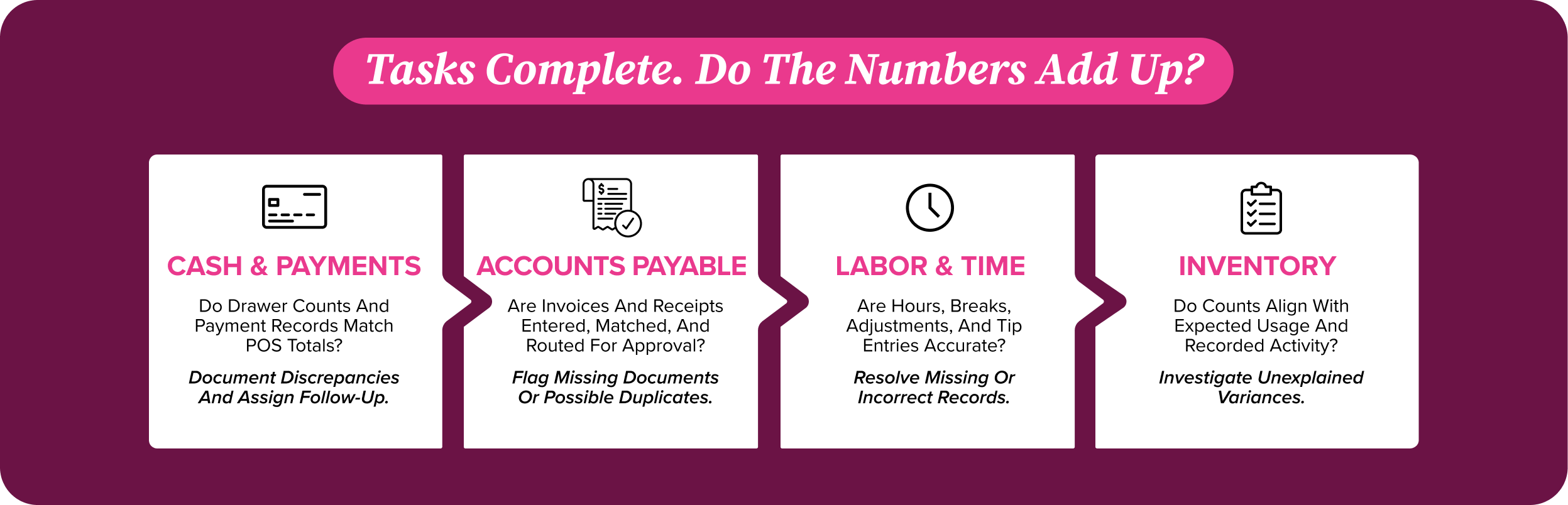
A robust nightly checklist keeps your team on task and the closing duties consistent. As an added layer of organization, creating a thorough manager checklist answers the next important question – does everything add up? A well-planned manager checklist helps to verify the work of all team members, reconcile the numbers, and document what needs follow-up. This final review is where small margin leaks get caught – or missed.
- Review Daily Sales Performance: Compare actual sales with forecasts and typical sales patterns to identify changes and make operational adjustments early.
- Verify Cash and Payment Reconciliation: Confirm drawer counts and payment records match POS totals, with discrepancies documented and assigned for follow-up.
- Confirm AP Processing Status for the Day: Verify invoices and receipts have been entered, matched to supporting documents, and routed for approval to avoid missed or duplicate payments.
- Monitor Labor Costs & Employee Hours: Compare actual labor hours with scheduled levels and sales volume to identify overtime and adjust staffing.
- Review Inventory Variances: Compare stock counts with expected inventory and check waste, transfer, and incoming delivery records to investigate discrepancies.
- Check Payroll Compliance Entries: Review time adjustments, break records, and tip entries for accuracy to catch errors before payroll processing.
- Confirm Compliance & Safety Procedures: Verify required safety logs, sanitation checks, and corrective actions are documented, escalating any unresolved issues if needed.
- Prepare Operational Notes for the Next Shift: Document equipment issues, staffing needs, or stock concerns with clear follow-up responsibilities to the next shift.
Common Restaurant Closing Mistakes
When you’re tired after a long day, it’s tempting to leave an unfinished task for the next shift. But these seemingly simple shortcuts can start affecting your bottom line if left unchecked. Your closing checklist helps avoid these common mistakes:
- Skipping Cash Reconciliation: Without comparing drawer counts and payment records against POS totals, shortages and transaction errors can go unnoticed and affect your bottom line.
- Ignoring Inventory Discrepancies: Unexplained inventory differences can hide waste, receiving errors, or theft, leaving you with inaccurate counts and food cost issues that compound over time.
- Leaving Food Storage Incomplete: Unsealed containers, missing labels, and improperly stored ingredients can lead to spoilage, contamination, and avoidable product loss.
- Forgetting Equipment Inspections: Overlooked leaks, temperature problems, or equipment damage can turn into lost inventory, expensive repairs, and interrupted service.
- Relying on Paper Checklists Alone: Without automated flags and triggers, paper records can often leave missed tasks and unresolved issues out of sight.
Best Practices for an Efficient Restaurant Closing Routine
Once your checklist is in place, getting the most out of it comes down to how consistently your team uses it. Following a few practical habits can help get the most value from your closing routine.
- Standardize Closing Procedures Across Every Shift: Give every closing team the same task sequence and completion standards to follow.
- Assign Clear Responsibilities to Team Members: Name one owner for each task so everyone knows what they must complete before leaving.
- Use Digital Checklists Instead of Paper Forms: Use a shared digital checklist with timestamps and sign-offs to make progress and unfinished work visible across your team.
- Monitor Closing Performance with Reports: Review closing reports for recurring missed tasks, cash or inventory variances, or repeated issues that could indicate a pattern.
- Review Closing Procedures Regularly: Update your checklist as your restaurant needs change to keep instructions current and relevant.
How Restaurant Management Software Simplifies Closing Operations
Restaurant management software connects the records behind your closing checklist, helping you review the day’s activity without chasing paperwork. The right software system can reduce manual work and catch issues sooner through several key processes:
- Automating Cash Reconciliation & AP Processing: Connected systems automatically match recorded payments against sales and list invoices for approval, allowing managers to quickly review key financial documents.
- Tracking Inventory in Real Time: Integrated sales and inventory records update expected stock levels as activity is recorded, helping managers spot shortages and compare counts against expected usage.
- Centralizing Financial Reporting: Consolidated sales, expense, and payment reports give managers a snapshot view of critical performance metrics.
- Supporting Payroll, Compliance & Time Tracking: Centralized time records, tip entries, and approval histories help managers verify employee hours and flag missing or inaccurate information before payroll is processed.
- Delivering Actionable Closing Insights: Automated reports highlight recurring cash shortages, inventory variances, and labor overruns, helping managers identify patterns and make targeted adjustments to address operational issues.
Simplify Restaurant Closing with BEP Back Office
A reliable restaurant closing checklist helps your team protect cash, control inventory, and prepare for tomorrow. Clear responsibilities and manager oversight make that routine repeatable, giving you confidence in the close even when you’re not on a shift.
For maximum efficiency, consider where connected systems could reduce manual work and make discrepancies easier to spot. BEP Back Office unifies AP, inventory, payroll, and accounting in one system—a practical next step for operators ready to digitize and automate the financial side of closing. To see how connected systems could reduce workload and increase efficiency in your restaurant, request a free demo from the Back Office team today.
Key Takeaways
- Include FOH, BOH, financial, inventory, and security tasks in your closing checklist to protect margins and prepare the next shift.
- Assign each closing task to a specific team member and require sign-off to build consistency across shifts.
- Have managers verify financial records, labor entries, and inventory variances to catch issues beyond task completion.
- Use digital checklists and integrated financial reporting to reduce manual work and oversee closing performance remotely.
FAQ’s
What should be included in a restaurant closing checklist?
A restaurant closing checklist should cover FOH cleaning, BOH sanitation and food storage, cash reconciliation, inventory checks, staff sign-offs, and security. Include manager reviews of financial records, labor entries, and unresolved issues, with clear ownership for every task.
Who is responsible for restaurant closing procedures?
Each team member is responsible for their assigned closing tasks, while the closing manager verifies completion, reviews financial records, and oversees final lockup. Clear assignments and required sign-offs help keep the process consistent, even when the owner is off-site.
How does a closing checklist improve restaurant operations?
A closing checklist helps prevent missed tasks, reduce food waste, catch cash discrepancies, and prepare the next shift. Standardizing the routine also creates accountability and gives managers a clear record of issues that need follow-up.
Can restaurant software automate restaurant closing tasks?
Restaurant software can automate parts of closing, including payment reconciliation, invoice routing, inventory updates, and financial reporting. Connected records reduce manual work and help managers spot discrepancies, while employees remain responsible for physical tasks and final verification.